LG777 Game APK Download for Android
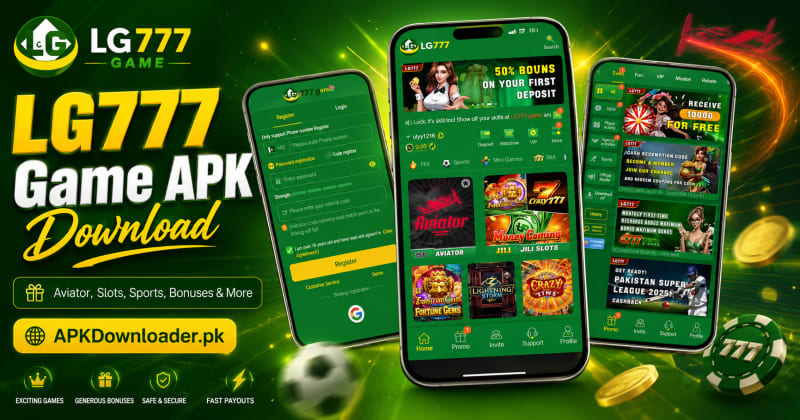
LG777 Game brings Aviator, slot games, sports, mini-games, promotional events, and wallet features into one Android app. From the main dashboard, players can explore different games, check bonuses, invite friends, contact support, and manage deposits or withdrawals without switching between several platforms.
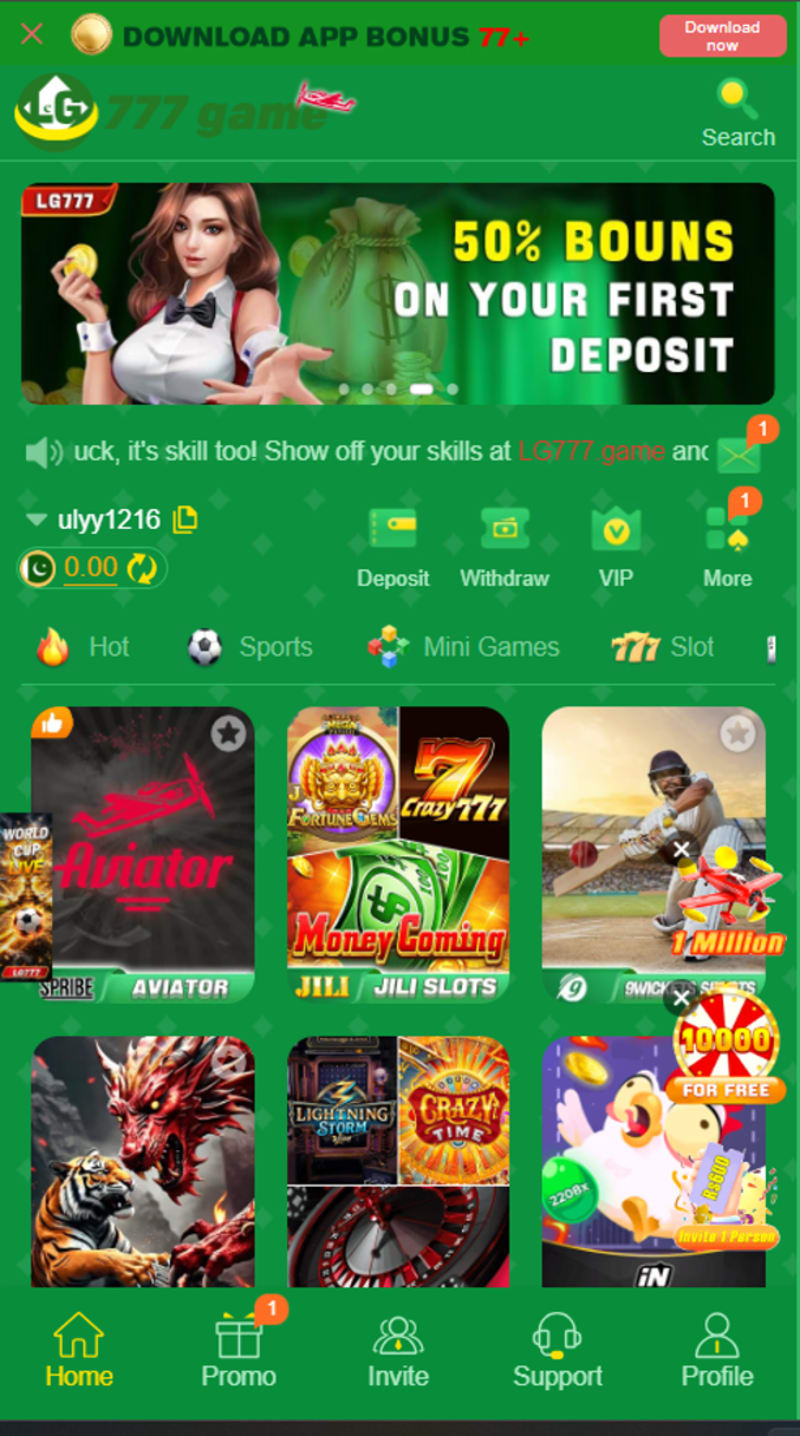
The layout is straightforward. Deposit, Withdraw, VIP, Promo, Invite, Support, and Profile are easy to find, while JazzCash and Easypaisa are available in the payment section.
New players can also enter the demo before creating an account. It’s a useful way to explore the interface, find the game categories, and understand how the platform works before using any real-money feature.
LG777 Game at a Glance
| Feature | Details |
|---|---|
| Game type | Multi-game Android platform |
| Main categories | Hot, Sports, Mini Games, and Slot |
| Popular content | Aviator, JILI slots, cricket games, and wheel games |
| Registration | Mobile number, password, or code |
| Demo | Available from the registration screen |
| Payment methods | JazzCash, Easypaisa, and additional FAST channels |
| Account tools | Deposit, Withdraw, VIP, Invite, Support, and Profile |
| Rewards | Bonuses, missions, rebates, and VIP offers |
| Internet required | Yes |
| Age requirement | 18+ |
| APK information | Version 1.4.1.2, 17MB, Android 5.0+, scanned 23 July 2026 |
What Is LG777 Game?
LG777 is a multi-game platform rather than a single standalone title. It combines Aviator, slots, sports content, mini-games, promotions, referrals, and account-wallet tools under one login.
The home screen is divided into four main categories:
- Hot
- Sports
- Mini Games
- Slot
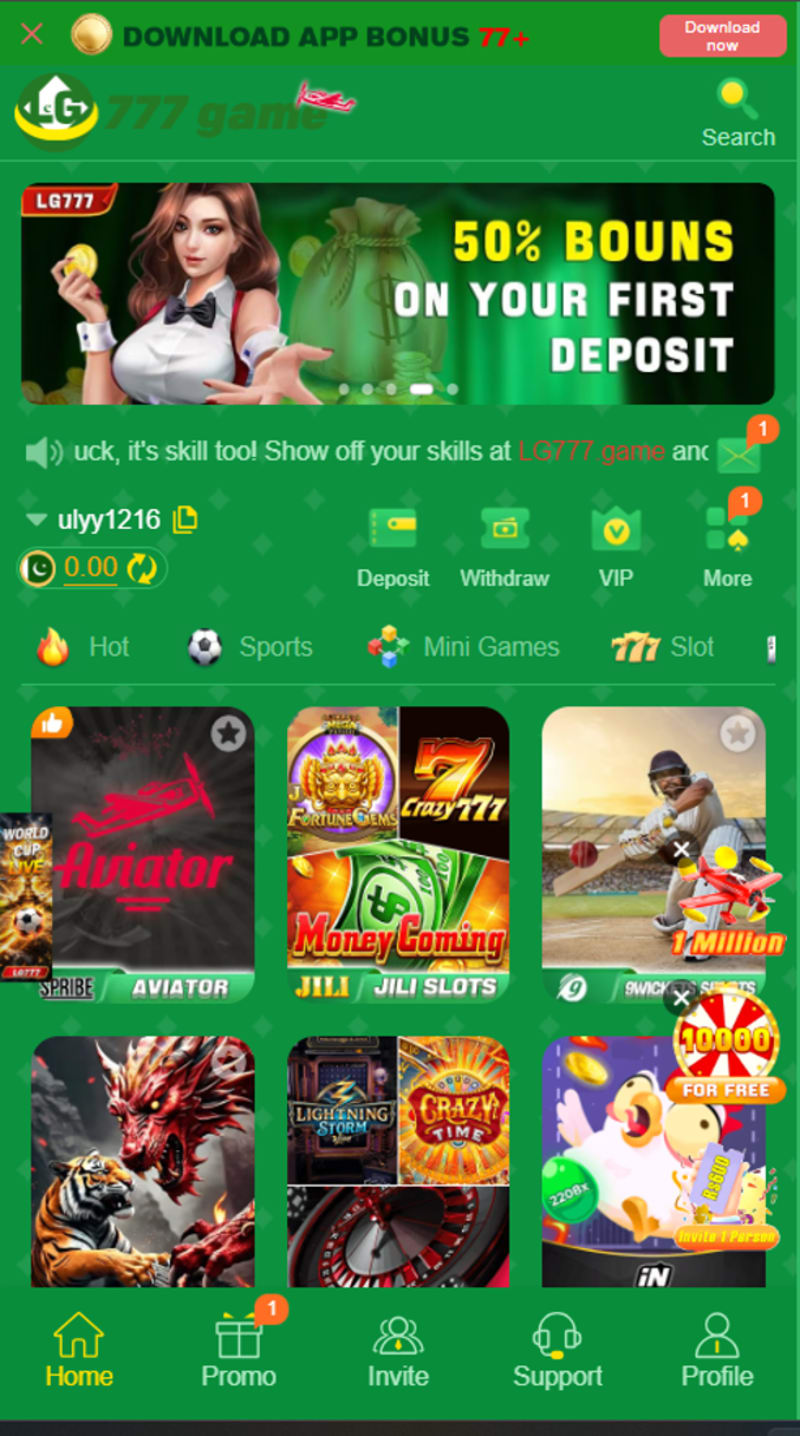
The Hot section highlights popular or promoted games. Sports includes cricket and other sports-related content, while Mini Games focuses on shorter rounds. The Slot section contains reel-based games, including titles from providers such as JILI.
Players can also use the app to check their balance, add funds, request withdrawals, view VIP rewards, join events, complete missions, claim rebates, invite friends, and contact customer support.
Why Players Choose LG777
The main attraction is variety. Players can switch from Aviator to slots, sports, wheel games, or mini-games without leaving the app.
LG777 also keeps its most-used controls close to the home screen. Users don’t have to open several menus just to find their balance, payment section, promotions, or support.
What Makes the App Convenient?
- Several game categories under one account
- Quick access to Deposit and Withdraw
- JazzCash and Easypaisa payment options
- Demo access before registration
- A dedicated promotions centre
- VIP, Mission, and Rebate sections
- Referral and invitation tools
- Customer support inside the app
- Simple mobile navigation
- Cricket and sports-related content
- Password and code-registration options
Main Features of LG777 Game
Multiple Games Under One Login
LG777 brings Aviator, slots, sports, mini-games, wheel games, and other quick-result titles together. This saves players from installing a separate APK for each type of game.
Your balance, promotions, profile settings, and support options also remain connected to the same account.
Simple Home-Screen Navigation
The most-used account controls appear close to the balance display.
| Button | What It Does |
|---|---|
| Deposit | Opens the payment section |
| Withdraw | Opens the cash-out section |
| VIP | Shows membership levels and rewards |
| More | Displays additional account tools |
| Promo | Shows events, missions, and rebates |
| Invite | Opens referral features |
| Support | Connects users with customer service |
| Profile | Opens account information and settings |
The lower navigation bar includes Home, Promo, Invite, Support, and Profile. This makes it easy to move between the games and account features without repeatedly returning to the main menu.
Demo Access Before Registration
A Demo button appears on the registration screen. New users can use it to inspect the interface and browse part of the platform before creating a full account.
The demo is useful for checking:
- Available game categories
- Dashboard layout
- General loading speed
- Navigation controls
- Support location
- Current promotions
Some games or wallet functions may remain unavailable until registration is completed.
Mobile Number Registration
LG777 supports account creation through a +92 mobile number. New users can choose password registration or code registration.
The registration page includes:
- Mobile number field
- Password field
- Password-strength indicator
- Code-registration option
- Referral-code field
- 18+ confirmation
- User Agreement link
- Customer Service button
- Demo access
- Google account-binding option
Password tip: Don’t reuse the password connected to your JazzCash, Easypaisa, email, social-media, or online-banking account..
JazzCash and Easypaisa Payments
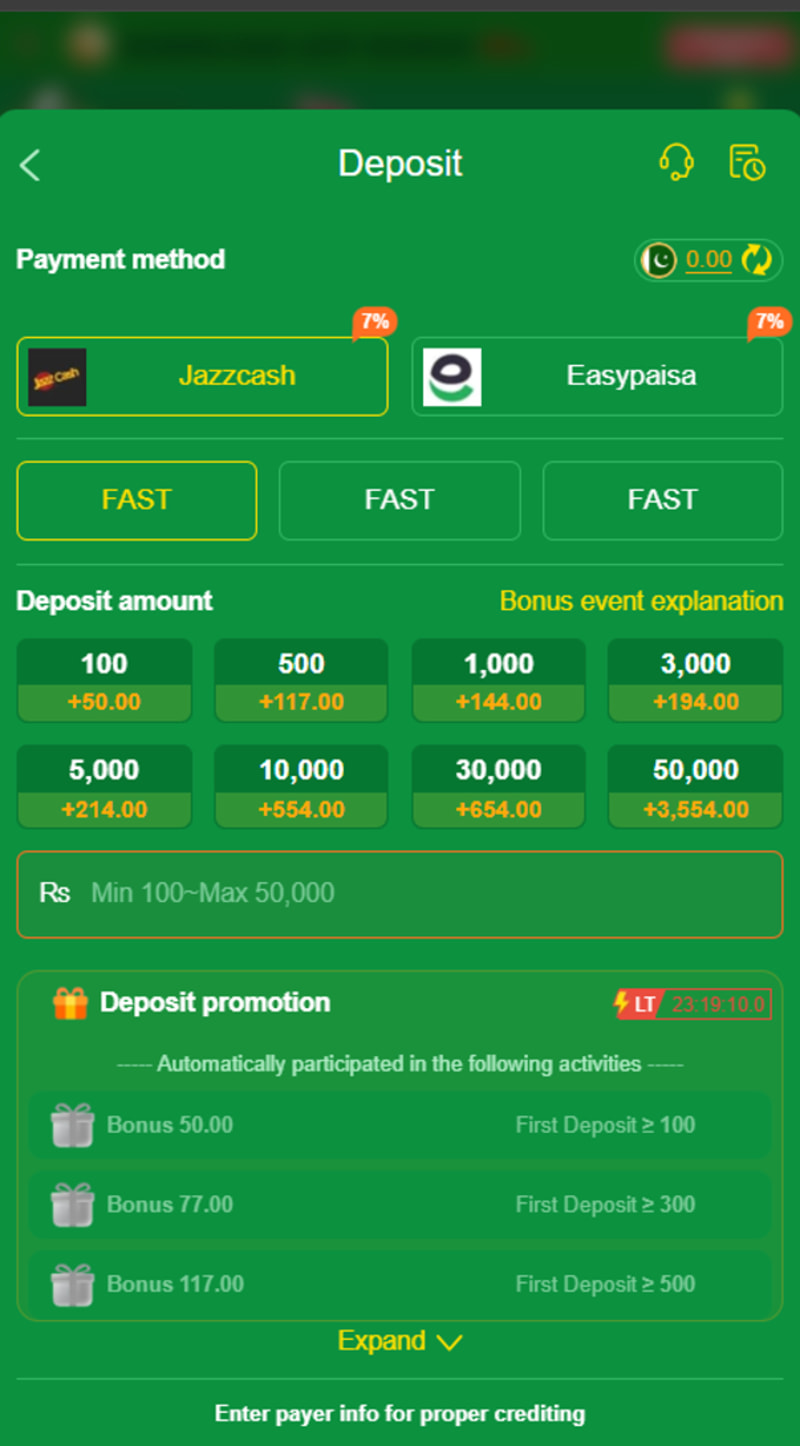
JazzCash and Easypaisa appear in the deposit section, along with additional FAST payment channels. These local options allow players to add funds without relying on an international card.
Payment availability may still change because of account limits, server maintenance, or temporary channel restrictions.
Promotions, Missions, and Rebates
The promotions area is separated into several tabs.
| Tab | Typical Purpose |
|---|---|
| Event | Time-limited campaigns and special activities |
| Fund | Account-balance or funding offers |
| VIP | Membership levels and VIP benefits |
| Mission | Tasks linked to selected rewards |
| Rebate | Returns linked to qualifying activity |
Offers can include first-deposit bonuses, recharge rewards, redemption codes, sports promotions, and member-only events.
Each promotion can have different rules. Check the minimum deposit, eligible games, turnover requirement, expiry date, and withdrawal restrictions before joining.
Referral and Invitation Features
The registration form includes a referral-code field, while the bottom menu has a separate Invite section.
A referral reward may depend on:
- Successful registration
- A valid mobile number
- First deposit
- Minimum game activity
- Matching account currency
- Account verification
- Promotion deadline
The invitation-code currency must match the currency selected for the new account.
VIP Membership
The VIP section is designed for users who meet certain account-activity requirements. Benefits can vary by level and may include rebates, deposit-related offers, special events, or priority support.
Always compare the value of the reward with the amount of activity needed to receive it. Spending more only to reach another VIP level may cost far more than the benefit.
Customer Support Inside the App
Customer Service is available from the registration page. After login, users can access Support from the bottom navigation.
Support may help with:
- Account registration
- Forgotten passwords
- Verification problems
- Deposit delays
- Withdrawal requests
- Promotion questions
- Game-loading errors
- Account restrictions
Games Available in LG777
LG777 offers a mixed game library instead of focusing on one format. Players can move between multiplier games, slots, sports content, wheels, and shorter mini-games.
Aviator
Aviator is a multiplier-style game. The displayed multiplier rises during the round, and the player must cash out before it stops.
The controls are easy to understand, but the result can change quickly. Waiting for a higher multiplier also increases the chance of losing the round.
Slot Games
The Slot section contains reel-based games with symbols, paylines, multipliers, free spins, and bonus rounds. JILI content is available alongside other slot-style titles.
Common slot formats include:
- Classic reel games
- Fruit-themed slots
- Jackpot-style games
- Bonus-wheel titles
- Free-spin rounds
- Multiplier features
- Themed reel games
Open the paytable before starting. It explains symbol values, bonus conditions, paylines, and the minimum stake for each spin.
Sports Games
The Sports tab includes cricket-related and other sports content. Some games may follow current matches, while others use sports themes in arcade, prediction, or chance-based formats.
The selection can change around major tournaments and sporting seasons.
Mini Games
Mini Games are generally designed for shorter sessions and quicker results.
- Wheel games
- Number games
- Prediction rounds
- Card-based games
- Quick multiplier games
- Simple tap-and-play titles
Hot Games
The Hot tab collects titles that are popular or currently being promoted. Games may move in and out of this section as player activity and campaigns change.
LG777 Game Category Comparison
| Category | What You’ll Find | Best For |
|---|---|---|
| Hot | Popular and promoted games | Players looking for trending titles |
| Sports | Cricket and other sports content | Sports-game fans |
| Mini Games | Short and simple rounds | Quick sessions |
| Slot | Reel games and bonus features | Slot players |
| Aviator | Rising multiplier rounds | Fast multiplier gameplay |
| Wheel Games | Spin-based results | Players who prefer simple controls |
No game should be treated as a dependable income source. Previous wins don’t change the result of the next round.
How to Register and Log In
Creating a New LG777 Account
- Open the LG777 app.
- Select Register.
- Confirm that +92 is selected.
- Enter your active mobile number.
- Create a strong password.
- Add a referral code if you have one.
- Tick the box confirming that you’re over 18.
- Read the User Agreement.
- Tap Register.
- Complete any phone or code verification requested by the app.
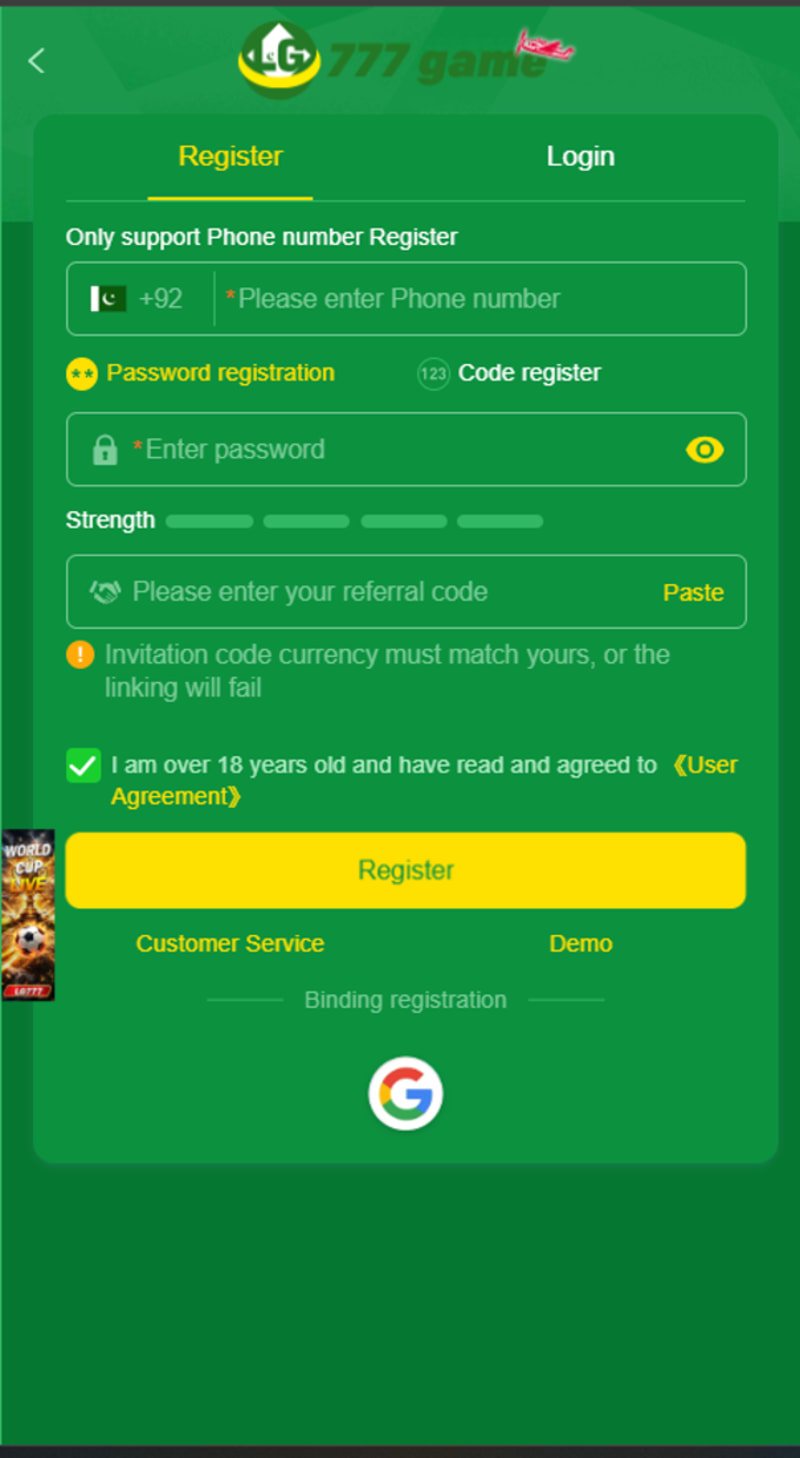
When entering a number after +92, you may need to remove the first zero. Follow the format displayed in the registration field.
Registration Checklist
☐ Use an active mobile number.☐ Confirm the +92 country code.
☐ Create a unique password.
☐ Check the referral code before submitting.
☐ Read the age and user-agreement notice.
☐ Save your login details securely.
☐ Never share a verification code.
Password Registration
Password registration creates a standard account using a mobile number and chosen password. Save both details before changing phones, updating the app, or clearing its data.
Code Registration
The Code Register option may use a verification code instead of the standard password process. Make sure your number is active, has network coverage, and can receive messages.
Avoid requesting several codes within a short period, as repeated attempts may cause temporary delays.
How to Log In
- Open LG777.
- Tap Login.
- Enter your registered mobile number.
- Enter your password or verification code.
- Tap the login button.
- Wait for the dashboard to load.
Login Checklist
☐ +92 is selected.☐ The phone number is entered correctly.
☐ Extra spaces have been removed.
☐ You’re using the correct password.
☐ The internet connection is working.
☐ The device date and time are correct.
☐ You’re on the Login tab rather than Register.
How to Use the LG777 Demo
The Demo button appears below the registration form. It allows new users to inspect part of the platform before completing account registration.
- Launch LG777.
- Stay on the registration screen.
- Tap Demo.
- Wait for the interface to load.
- Explore the available categories.
- Check where the support and wallet tools are located.
- Return to Register when you’re ready to create an account.
What to Check in Demo Mode
| Check | Why It Matters |
|---|---|
| Game selection | Confirms whether the app contains titles you enjoy |
| Navigation | Shows how easy the interface is to use |
| Loading speed | Helps identify connection or device problems |
| Support location | Makes help easier to find later |
| Promotions | Shows the types of current offers |
| Dashboard layout | Helps you locate important buttons |
Some games and wallet functions may remain locked until registration.
How to Deposit Through JazzCash or Easypaisa
The Deposit button is available on the main dashboard. From there, users can choose JazzCash, Easypaisa, or another active payment channel.
Deposit Steps
- Log in to your LG777 account.
- Tap Deposit.
- Select JazzCash, Easypaisa, or another available channel.
- Choose a preset amount or enter a custom figure.
- Read the active promotion details.
- Confirm the payment information.
- Complete the payment through your chosen wallet.
- Save the transaction ID.
- Return to LG777.
- Check whether the balance has been credited.
Deposit Amounts
The payment section includes amount options such as:
- Rs.100
- Rs.500
- Rs.1,000
- Rs.3,000
- Rs.5,000
- Rs.10,000
- Rs.30,000
- Rs.50,000
These limits can change. Check the live amount displayed in your account before sending money.
Safer Deposit Checklist
☐ Use the payment section inside the app.☐ Confirm the receiving-wallet details.
☐ Check the minimum and maximum amount.
☐ Read the current bonus conditions.
☐ Begin with a small test payment.
☐ Save the transaction ID.
☐ Take a screenshot of the receipt.
☐ Wait for the balance to update before sending more.
☐ Don’t use borrowed money.
☐ Don’t deposit money reserved for essential expenses.
LG777 Deposit Bonuses
LG777 includes first-deposit offers, recharge rewards, activity bonuses, event promotions, VIP benefits, rebates, and redemption codes.
A reward may appear as:
- Extra playable balance
- Fixed bonus amount
- Percentage-based reward
- Recharge promotion
- Event bonus
- VIP benefit
- Rebate
- Redemption code
Bonus Terms to Check
| Condition | Why It Matters |
|---|---|
| Minimum deposit | The reward may require a specific payment amount |
| Maximum bonus | The offer may stop at a set limit |
| Turnover requirement | The balance may need to be played through before withdrawal |
| Eligible games | Some titles may not count toward the offer |
| Expiry time | The reward may expire if it isn’t used or claimed |
| Withdrawal rule | Bonus funds may not be directly withdrawable |
| Account eligibility | The offer may be limited to selected or new accounts |
| Claim method | Some rewards require manual collection |
A large promotional banner rarely shows every condition. Open the full event explanation before completing a deposit.
How to Withdraw Money From LG777
The Withdraw button appears beside Deposit on the home screen. Opening it takes users to the available cash-out methods and account requirements.
Withdrawal Steps
- Log in to your account.
- Tap Withdraw.
- Select an available withdrawal method.
- Enter the receiving wallet or account details.
- Enter the amount.
- Review the information carefully.
- Complete any verification step.
- Submit the request.
- Save the request number or confirmation screenshot.
- Check the receiving wallet for the final payment.
The app may ask for:
- Player ID
- Mobile-wallet number
- Account-holder information
- Transaction password
- Verification code
- Withdrawal amount
Double-check every digit before submitting the request. A single incorrect number can delay or cancel the transaction.
Withdrawal Record Checklist
☐ Requested amount☐ Date and time
☐ Receiving wallet number
☐ Request ID
☐ Confirmation screenshot
☐ Support conversation
☐ Final wallet transaction
A “completed” label inside the app should match an actual credit in JazzCash, Easypaisa, or the selected receiving account.
If a Withdrawal Remains Pending
- Check the transaction history.
- Confirm that account verification is complete.
- Review any active bonus conditions.
- Recheck the receiving-wallet details.
- Save the request reference.
- Contact Support through the app.
- Avoid submitting duplicate requests unless support asks you to do so.
Promotions, Missions, and Rebates
The Promo section is divided into Event, Fund, VIP, Mission, and Rebate tabs. Each tab focuses on a different type of activity or reward.
Event
The Event area contains time-limited campaigns, recharge promotions, sports offers, and special activities.
Before joining an event, check:
- Start and end date
- Minimum deposit
- Eligible games
- Required activity
- Claim process
- Reward limit
- Withdrawal rules
Fund
The Fund section may include account-balance or funding-related activities. Check whether any displayed amount can be withdrawn or used only as playable balance.
VIP
VIP rewards depend on account activity and level requirements. The benefits may change as the account moves between levels.
Mission
Missions ask users to complete selected actions, such as logging in, opening certain games, or reaching an activity target.
Rebate
Rebates may return a portion of qualifying activity. They don’t remove the possibility of a loss and shouldn’t be viewed as guaranteed profit.
Redemption Codes
LG777 also features redemption-code activities. Use only codes published inside the app or through a channel linked directly from it.
Fake code pages may try to collect:
- Mobile numbers
- Passwords
- OTP codes
- Wallet information
- Identity documents
- Account screenshots
How the LG777 Referral System Works
The Invite section allows registered users to share a referral code or invitation link with another adult who wants to create an account.
- Open the Invite tab.
- Copy your referral code or invitation link.
- Share it with someone who wants to register.
- The new user enters the code during account creation.
- The account completes the required activity.
- The reward is added after all conditions are met.
Possible Referral Requirements
| Requirement | What It Means |
|---|---|
| Valid registration | The invited user must create a genuine account |
| Correct currency | The referral must match the account currency |
| First deposit | A qualifying payment may be required |
| Game activity | The account may need to use selected games |
| Verification | Phone or identity confirmation may be required |
| Promotion period | The steps must be completed before the deadline |
Referral rewards aren’t automatic. Read the current invitation rules before sharing your code.
How to Download LG777 Game APK
- Tap the LG777 APK download button.
- Wait for the browser to finish downloading the file.
- Open the browser’s Downloads section.
- Confirm that the filename ends with
.apk. - Tap the downloaded file.
- Allow installation when Android requests permission.
- Select Install.
- Wait for the process to finish.
- Open LG777.
- Register, log in, or enter the demo.
Downloaded APK files normally appear in the Downloads folder inside Files, My Files, or File Manager.
How to Install LG777 APK on Android
Android may block apps downloaded outside Google Play until installation permission is granted to the browser or file manager.
Installation Steps
- Open Settings.
- Go to Apps or Security.
- Select Special app access.
- Open Install unknown apps.
- Choose Chrome, your browser, or Files.
- Turn on Allow from this source.
- Return to the downloaded LG777 APK.
- Tap the file.
- Select Install.
- Wait for Android to finish.
- Tap Open.
- Turn off unknown-app installation permission afterwards.
Menu names vary across Samsung, Xiaomi, Oppo, Vivo, Realme, Infinix, Tecno, and other Android phones. Search for “Install unknown apps” inside Settings if the option is difficult to locate.
Before Installation
☐ Your phone runs Android 5.0 or newer.☐ At least 100MB of storage is free.
☐ The APK download has completed.
☐ The internet connection is stable.
☐ Play Protect is enabled.
☐ Existing account details are saved.
☐ Unknown-app permission is enabled only temporarily.
Android Requirements
The initial APK is 17MB, but the installed app may use more storage after loading game data, images, updates, and cached files.
| Requirement | Minimum | Better Experience |
|---|---|---|
| Android version | Android 5.0 | Android 10 or newer |
| Free storage | 50MB | 150MB or more |
| RAM | 1GB | 2GB or more |
| Internet | Mobile data | Stable 4G or Wi-Fi |
| Security | Play Protect enabled | Updated Android and Play Protect |
Phones with limited storage should remove unnecessary downloads and cached files before installation.
How to Update LG777
A newer APK can usually be installed over the existing app without removing account information.
- Save your registered phone number and password.
- Download the newer LG777 APK.
- Don’t uninstall the current app first.
- Open the new APK.
- Tap Update when Android shows the option.
- Wait for installation to finish.
- Open the app and check your account.
Before Updating
- ☐ Save your registered number.
- ☐ Confirm that you know your password.
- ☐ Take note of pending transactions.
- ☐ Download from the same trusted source.
- ☐ Install over the existing app first.
- ☐ Uninstall only if no safer option remains.
If Android reports a package or signature conflict, the new APK may not match the installed version. Save your login details before deleting anything.
LG777 Compared With Other Game Types
| Feature | LG777 Game | Browser Gaming Site | Single-Game APK |
|---|---|---|---|
| Installation required | Yes | No | Yes |
| Multiple game categories | Yes | Usually | Usually limited |
| Aviator and slots | Available | Depends on platform | Often one main game |
| Deposit and withdrawal wallet | Included | Often included | Usually absent |
| JazzCash and Easypaisa | Available | Depends on platform | Uncommon |
| Demo option | Available | Sometimes | Depends on title |
| Promotions centre | Included | Often included | Usually limited |
| Referral system | Included | Sometimes | Uncommon |
| Manual updates | Required | No | Required |
| Internet connection | Required | Required | Depends on game |
LG777 is better suited to players who want several categories, wallet functions, and promotions in one installed app. A browser platform may be more convenient for someone who doesn’t want to install an APK.
For a broader comparison, visit our complete All 777 Games APK guide .
LG777 Pros and Cons
| Pros | Cons |
|---|---|
| Several game categories in one app | Manual APK installation is required |
| Aviator, slots, sports, and mini-games | An internet connection is needed |
| Demo option for new players | Real-money play can result in loss |
| JazzCash and Easypaisa available | Promotions may include restrictions |
| Easy Deposit and Withdraw buttons | Bonus balance may not be directly withdrawable |
| VIP, Mission, and Rebate sections | Events and limits can change |
| Referral and invitation tools | Not suitable for anyone under 18 |
| Customer support inside the app | Account details must be protected carefully |
| Simple mobile dashboard | Updates may require another APK download |
Practical Tips for Using LG777
Start With the Demo
Explore the dashboard before registering. It helps you understand the game categories, navigation, support section, and wallet buttons.
Use a Unique Password
Don’t reuse the password connected to your JazzCash, Easypaisa, email, banking, or social-media account.
Save Your Registration Details
Keep the registered phone number and password in a secure password manager or protected note.
Read Bonus Rules First
Check the deposit conditions, turnover requirements, expiry dates, and eligible games before claiming an offer.
Test Payments With a Small Amount
Use the lowest available amount when testing a payment method for the first time. Wait for the balance to update before sending another payment.
Keep Transaction Evidence
Save screenshots of:
- Deposit instructions
- Wallet receipt
- Transaction ID
- Withdrawal request
- Support conversation
- Final payment confirmation
Set a Spending Limit
Choose an amount you can afford to lose before opening a real-money game. Stop when that limit is reached.
Don’t Chase Losses
A previous loss doesn’t improve the chance of winning the next round. Adding more money to recover losses can quickly make the situation worse.
Common LG777 Problems and Solutions
| Problem | Possible Reason | What to Do |
|---|---|---|
| APK won’t download | Weak connection or browser issue | Change connection and restart the download |
| App not installed | Damaged file or old-version conflict | Download again and check the installed version |
| Parse error | Incomplete APK or unsupported Android version | Confirm Android 5+ and download a fresh file |
| Installation blocked | Unknown-app permission is disabled | Enable it for the browser or Files app |
| App closes after opening | Low memory or damaged cache | Restart the phone and clear the app cache |
| Dashboard keeps loading | Network or server problem | Switch between Wi-Fi and mobile data |
| Login doesn’t work | Wrong number format or password | Check +92 and re-enter the details |
| Verification code not received | Signal delay or incorrect number | Confirm the number and wait before retrying |
| Deposit not showing | Payment is still processing | Save proof and contact in-app support |
| Withdrawal is pending | Verification or payment delay | Check transaction history and contact support |
| Game screen is blank | Cache or connection issue | Restart the app and change network |
| Update fails | Signature conflict | Save login details before reinstalling |
How to Fix “App Not Installed”
- Delete the incomplete APK.
- Restart the phone.
- Free some storage space.
- Download the file again.
- Enable unknown-app installation for the browser.
- Open the APK from Downloads.
- Check whether an older LG777 version is installed.
- Tap Update when Android offers that option.
- Save your login information before uninstalling anything.
- Reinstall only as a last step.
An update can fail when the old and new APK files use different digital signatures. Android blocks the installation to protect the existing app data.
How to Fix a Parse Error
A parse error means Android can’t read the APK correctly.
Common causes include:
- The download stopped before completion.
- The file is damaged.
- The Android version is too old.
- The .apk extension was changed.
- The browser saved an incomplete file.
- The APK was modified incorrectly.
Delete the damaged file, restart the browser, and download a fresh copy. Wait until the download finishes before opening it.
How to Fix Registration or Login Problems
- ☐ Confirm that +92 is selected.
- ☐ Enter the mobile number in the correct format.
- ☐ Make sure you’re on the correct Register or Login tab.
- ☐ Remove accidental spaces from the password.
- ☐ Check the internet connection.
- ☐ Confirm that SMS messages aren’t blocked.
- ☐ Check that the referral code uses the correct currency.
- ☐ Set the phone’s date and time correctly.
Use Customer Service inside the app if the issue continues.
How to Fix a Missing Deposit
- Check the JazzCash or Easypaisa transaction status.
- Confirm that the payment was completed.
- Save the transaction ID.
- Take a screenshot of the receipt.
- Open the LG777 transaction history.
- Wait for the normal processing period.
- Contact Support through the app.
- Provide the amount, time, and transaction reference.
Don’t repeat the payment until the first transaction has been checked.
How to Fix a Pending Withdrawal
A withdrawal may remain pending because of:
- Account verification
- Incorrect wallet details
- Bonus turnover requirements
- Payment-channel delays
- Account review
- Temporary system load
Open the withdrawal history and note the request number. Contact support with the amount, request time, and receiving-wallet information.
Never share your wallet PIN or OTP during the support process.
Account and Payment Safety
Protecting your account matters just as much as installing the correct APK.
Never Share These Details
- Account password
- SMS verification code
- OTP
- JazzCash PIN
- Easypaisa PIN
- Transaction password
- Full identity documents in public groups
- Remote access to your phone
Permissions That Need Extra Attention
Be careful if an app requests access to:
- Contacts
- SMS messages
- Accessibility settings
- Call logs
- Microphone
- Camera
- Photos and storage
- Device administrator controls
A permission request doesn’t automatically prove harmful behaviour. However, the app should have a clear reason for needing sensitive access.
After Installation Checklist
☐ Turn off unknown-app installation permission.☐ Keep Play Protect enabled.
☐ Use a screen lock.
☐ Don’t store wallet PINs in plain notes.
☐ Avoid unofficial bonus groups.
☐ Report strange redirects or pop-ups.
☐ Remove the app if it behaves unexpectedly.
☐ Review account activity regularly.
Frequently Asked Questions
What is LG777 Game?
LG777 is an Android gaming platform that includes Aviator, slot games, sports content, mini-games, promotions, wallet features, and referral activities.
How do I download LG777 Game APK?
Tap the download button, wait for the APK to finish, and open it from the Downloads folder. Allow installation from your browser or file manager when Android asks.
Does LG777 have Aviator?
Yes. Aviator-style content is available in the game section.
What games are available in LG777?
The main categories are Hot, Sports, Mini Games, and Slot. Available titles include Aviator, JILI slots, cricket-related games, wheel games, and other quick games.
Can I use LG777 without registering?
The app includes a Demo option that lets users explore part of the platform. Full account and wallet features may require registration.
How do I register on LG777?
Enter your mobile number with the +92 code, create a password, add a referral code if available, confirm that you’re over 18, and tap Register.
Does LG777 support JazzCash?
Yes. JazzCash appears in the deposit section.
Does LG777 support Easypaisa?
Yes. Easypaisa appears alongside JazzCash as an available payment method.
What is the minimum LG777 deposit?
The payment section includes an amount starting from Rs.100. Live limits can change, so check the amount displayed inside the app before paying.
How do I withdraw money from LG777?
Tap Withdraw from the home screen, select an available method, enter the correct wallet details and amount, complete verification, and submit the request.
Why is my deposit not showing?
The payment may still be processing, or the transaction reference may need to be checked. Save the receipt and contact support through the app.
Why is my withdrawal pending?
A pending request may be caused by account verification, bonus rules, incorrect wallet details, or payment-channel delays.
Why does the APK show “App not installed”?
The file may be incomplete, the phone may have low storage, unknown-app permission may be disabled, or an existing version may use a different signature.
Can I update LG777 without deleting it?
Usually, yes. Download the newer APK and install it over the existing version. Save your phone number and password before updating.
Does LG777 offer bonuses?
The app includes first-deposit promotions, recharge rewards, missions, VIP benefits, rebates, events, and redemption-code activities. Each offer can have different conditions.
Can LG777 guarantee earnings?
No. Results can lead to wins or losses, and no game, bonus, referral, or strategy guarantees profit.
Is LG777 suitable for children?
No. Users must confirm that they’re over 18, and the app includes casino-style and real-money features.
How do I contact LG777 customer support?
Use Customer Service on the registration page or open the Support tab after logging in.
Final Verdict
LG777 brings Aviator, slots, sports, mini-games, promotions, referrals, and wallet features into one Android app. Its interface is easy to follow, important account controls are simple to locate, and the demo lets new users explore before registering.
JazzCash and Easypaisa make deposits familiar, but convenience shouldn’t replace caution. Read every offer, check payment details carefully, protect your login information, and keep proof of each transaction.
The app is best suited to adults who enjoy having several game categories under one account and understand the risks attached to real-money play.
Start with the demo. Set a firm spending limit. Treat every bonus as conditional until you’ve read the rules. A good gaming session should end when your planned time or budget ends not when the app asks you to continue.